 日本語
日本語
Sequence Editing and Visualization in One Place
Edit DNA sequences while viewing maps and annotations in the same workflow. Move from inspection to modification without switching software.
GeneQuick is a desktop app for molecular biology that brings together DNA sequence editing, plasmid map visualization, restriction enzyme analysis, AB1 chromatogram analysis, sequence alignment, and primer design in one place. Whether you work in a lab or on your personal laptop, you can start immediately.
 14-Day Free Trial
 One-Time Lifetime License
 Multilingual Support
 Offline Use Available
 macOS / Windows
 Supports Major Sequence Formats
Open, inspect, compare, design, and save — all the tasks you repeat every day in molecular biology can be handled in one app without jumping between multiple tools. GeneQuick is built to reduce friction while keeping the accuracy and usability researchers need.
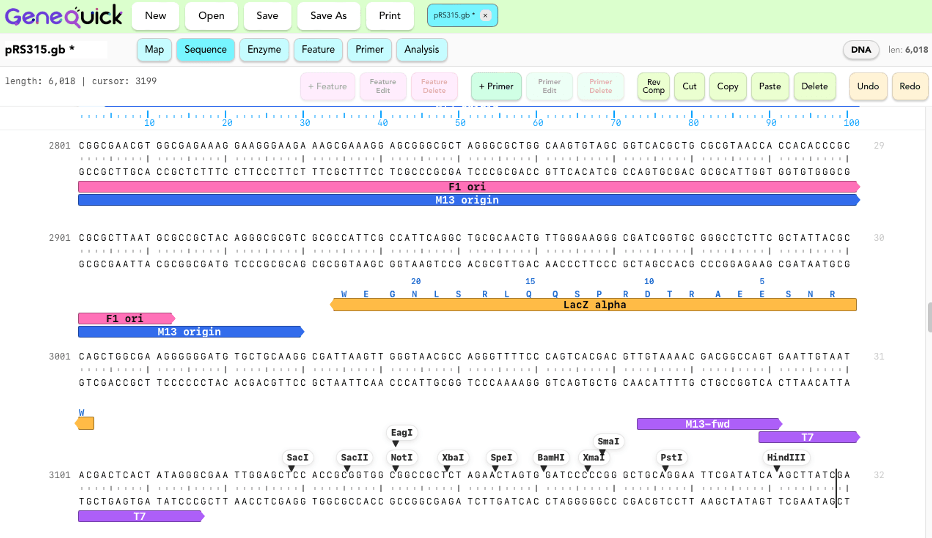
Edit DNA sequences while viewing maps and annotations in the same workflow. Move from inspection to modification without switching software.

Standard restriction enzymes are available out of the box. Search, add, switch display modes, and jump through cut sites to accelerate cloning design checks.
Enter adaptor and annealing sequences, generate reverse complements, add restriction enzyme sites, and check Tm and GC% without leaving the app.
Load .ab1 files, inspect chromatograms, compare against templates, and perform re-alignment as part of a practical sequence verification workflow.

The .geneq format preserves features, primers, and alignments, while GenBank and FASTA export make it easy to work with other software.

GeneQuick works well on shared lab computers and personal laptops alike, so you can resume your work wherever you are.
From sequence editing and plasmid maps to analysis and primer design, learn what each function is for and how it fits into real research workflows.
View Feature DetailsFrom download and first launch to license purchase and activation, this guide walks you through the steps that users most often need help with.
View Setup ManualGeneQuick is sold as a one-time purchase — no subscription required. Once activated, you can keep using it without recurring fees. Internet access is required only for license activation; regular use can continue offline.
Experience core features such as sequence editing, plasmid maps, AB1 analysis, alignment, and primer design at no cost.
A standard license designed for researchers and laboratory users. After purchase, you can activate the app using the license information sent by email.
A special lower-cost license for students who want an accessible way to use GeneQuick in coursework or research.
GeneQuick is designed for comfortable use as a desktop application. Internet access is only required for license activation. Regular work can continue offline.
 macOS
macOS
(Apple Silicon Mac, Sonoma or later)
 Windows
(Windows 11 or later)
.gb / .gbk / .fasta / .fa / .seq / .dna / .ape /.ab1 / .geneq
Use your existing sequence data without changing formats.
After purchase, simply enter your email address and license key to activate GeneQuick. Once activated, you can use the full version immediately.
The Standard License can be used on up to 2 PCs, and the Student License on 1 PC. To move your license to another computer, deactivate it on your current device first.
If you cannot deactivate it because of device failure, please contact support.
Frequently Asked Questions
Simplify the routine tasks you do every day in molecular biology. GeneQuick is a personal desktop tool built to make sequence work lighter and faster.